

x402 on Algorand
x402 is an open payment protocol that lets services charge for API access directly over HTTP. Clients pay per request using the 402 Payment Required status code — no sessions, API keys, or credential management required.
The protocol has three participants: a client sends a request, a resource server returns payment requirements (or the response if already paid), and a facilitator verifies and settles payments on-chain.
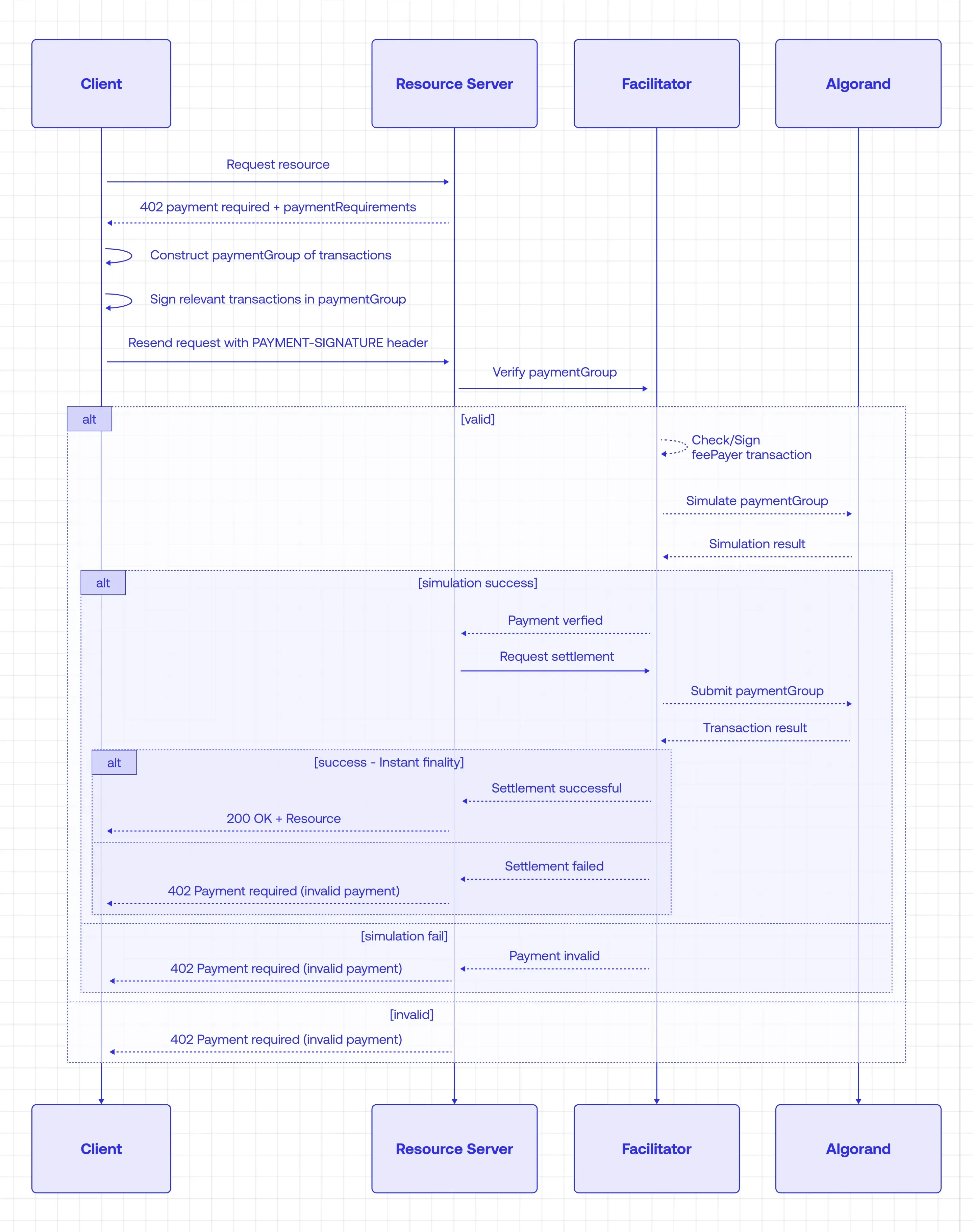
This tutorial walks through the protocol by building a working example on Algorand TestNet. You will build a pay-per-API /weather endpoint. Unpaid requests get 402 Payment Required; paid requests get JSON back. You will:
- Build a client that automatically pays when it receives a 402 response
- Build a resource server that charges for
GET /weather - Run both locally end-to-end
Build a pay-per-API service with x402
Section titled “Build a pay-per-API service with x402”Prerequisites
Section titled “Prerequisites”Complete these steps in order before running code:
-
Create two TestNet accounts: one for the client (the payer) and one for the resource server (the receiver).
-
Fund both accounts with TestNet ALGO using the Lora faucet. See fees and minimum balance.
-
Opt both accounts into TestNet USDC through Lora or your wallet. See opt in to assets.
-
Get USDC on both accounts from the Circle testnet faucet. Select Algorand Testnet and fund each address.
-
Save these values for later: the client’s payer mnemonic (used as
AVM_MNEMONIC) and the resource server’s public address (used asAVM_ADDRESS).
Part 1: Build the client
Section titled “Part 1: Build the client”In this part you’ll build a client that sends a request, handles the 402 response, signs and submits payment, then retries with proof of payment. You’ll test it against a hosted resource server before building your own in Part 2.
Create the project
Section titled “Create the project”mkdir x402-demo-clientcd x402-demo-clientpnpm initAdd TypeScript tooling
Section titled “Add TypeScript tooling”pnpm add -D typescript @types/node tsxInstall dependencies
Section titled “Install dependencies”pnpm add @x402/core @x402/fetch @x402/avm @algorandfoundation/algokit-utils@10.0.0-alpha.42 dotenvClient config
Section titled “Client config”Create tsconfig.json in the project root:
{ "compilerOptions": { "target": "ES2022", "module": "NodeNext", "moduleResolution": "NodeNext", "strict": true, "skipLibCheck": true, "esModuleInterop": true, "types": ["node"] }, "include": ["**/*.ts"]}Environment variables
Section titled “Environment variables”Add .env to .gitignore, then create .env:
AVM_MNEMONIC="your 25-word mnemonic here"Plain fetch first (expect 402)
Section titled “Plain fetch first (expect 402)”Before adding the x402 libraries, confirm the endpoint requires payment. A plain fetch should return HTTP 402.
Create index.ts at the project root:
const url = 'https://x402.goplausible.xyz/examples/weather';
async function main(): Promise<void> {  const response = await fetch(url, { method: 'GET' });  console.log('status:', response.status, response.statusText);  const paymentHeader = response.headers.get('payment-required');  if (paymentHeader) {    console.log('payment-required (first 80 chars):', paymentHeader.slice(0, 80) + '...');  }}
main().catch(console.error);
Run:
pnpm tsx index.tsExpected output (your payment-required value will differ):
status: 402 Payment Requiredpayment-required (first 80 chars): eyJhbGciOiJIUzI1NiIsInR5cCI6IkpXVCJ9.eyJzY2hlbWUiOiJleGFjd...Add x402 payment support
Section titled “Add x402 payment support”Now replace index.ts with the paying version. Instead of a plain fetch, wrapFetchWithPayment intercepts 402 responses, signs an Algorand payment using the mnemonic from AVM_MNEMONIC, and retries the request with the payment proof attached. This requires the Setup above: funded accounts, asset opt-in, and TestNet USDC.
import { config } from 'dotenv';import { x402Client, wrapFetchWithPayment, x402HTTPClient } from '@x402/fetch';import { toClientAvmSigner, ExactAvmScheme, ALGORAND_TESTNET_CAIP2 } from '@x402/avm';import {  ed25519SigningKeyFromWrappedSecret,  type WrappedEd25519Seed,} from '@algorandfoundation/algokit-utils/crypto';import { seedFromMnemonic } from '@algorandfoundation/algokit-utils/algo25';
config();
const avmMnemonic = process.env.AVM_MNEMONIC as string;const url = 'https://x402.goplausible.xyz/examples/weather';
async function main(): Promise<void> {  const secretKey = await getSecretKeyFromMnemonic(avmMnemonic);
  // Create the Algorand signer used to authorize payments.  const avmSigner = toClientAvmSigner(secretKey);
  // Initialize the x402 client.  const client = new x402Client();
  // Register Algorand testnet scheme  client.register(ALGORAND_TESTNET_CAIP2, new ExactAvmScheme(avmSigner));
  console.info(`AVM signer: ${avmSigner.address}`);
  // Wrap fetch so 402 responses trigger payment handling automatically.  const fetchWithPayment = wrapFetchWithPayment(fetch, client);
  // Make request  const response = await fetchWithPayment(url, {    method: 'GET',  });
  if (response.ok) {    // Read payment settlement headers    const paymentResponse = new x402HTTPClient(client).getPaymentSettleResponse(name =>      response.headers.get(name),    );
    console.log('\nPayment response:');    console.log(JSON.stringify(paymentResponse, null, 2));
    // Read the resource server response body    const data = await response.json();
    console.log('\nWeather response:');    console.log(JSON.stringify(data, null, 2));  } else {    console.log(`\nNo payment settled (response status: ${response.status})`);  }}
// Build the base64-encoded signing key that x402-avm expects.// Format = 32-byte Ed25519 seed + 32-byte public keyasync function getSecretKeyFromMnemonic(avmMnemonic: string): Promise<string> {  const seed = seedFromMnemonic(avmMnemonic);
  const seedCopy = new Uint8Array(seed);
  const wrappedSeed: WrappedEd25519Seed = {    unwrapEd25519Seed: async () => seed,    wrapEd25519Seed: async () => {},  };
  const wrappedSecret = await ed25519SigningKeyFromWrappedSecret(wrappedSeed);
  return Buffer.concat([Buffer.from(seedCopy), Buffer.from(wrappedSecret.ed25519Pubkey)]).toString(    'base64',  );}
main().catch(error => {  console.error(error?.response?.data?.error ?? error);  process.exit(1);});
Run the paying client from the project root:
pnpm tsx index.tsExpected output (addresses and transaction IDs will differ):
AVM signer: ABC123...Payment response: { "success": true, "payer": "ABC123...", "transaction": "TXID...", "network": "algorand:..."}Part 2: Build the resource server
Section titled “Part 2: Build the resource server”In this part you’ll build a resource server that hosts a /weather endpoint. It returns a 402 response when a request lacks valid payment and delegates verification to the facilitator, only serving data once payment is confirmed.
Create the server project
Section titled “Create the server project”mkdir x402-demo-servercd x402-demo-serverpnpm initAdd TypeScript tooling
Section titled “Add TypeScript tooling”pnpm add -D typescript @types/node tsxInstall dependencies
Section titled “Install dependencies”pnpm add @x402/core @x402/avm @x402/hono @x402-avm/extensions hono @hono/node-server dotenvServer config
Section titled “Server config”Similarly, copy the tsconfig.json from Client config.
Environment variables
Section titled “Environment variables”Add .env to .gitignore, then create .env:
AVM_ADDRESS=FACILITATOR_URL=https://facilitator.goplausible.xyzUse the resource server account’s public address for AVM_ADDRESS (Setup). FACILITATOR_URL points to the hosted facilitator, so you do not need to run facilitator code for this tutorial.
Implement GET /weather
Section titled “Implement GET /weather”Create index.ts at the project root. The paymentMiddleware function intercepts incoming requests and checks for a valid payment proof before forwarding to your route handler — unpaid requests get a 402 response with payment instructions.
The accepts array defines what the server will accept as payment. Each entry specifies the scheme, price, network, and recipient. The network value algorand:SGO1GKSzyE7IEPItTxCByw9x8FmnrCDexi9/cOUJOiI= is the CAIP-2 identifier for Algorand TestNet — this tells clients which chain to submit payment on.
This server also includes bazaar discovery metadata, which helps clients discover paid x402 resources by describing each route’s method, price, response type, and example output in the 402 Payment Required response. If you use the hosted GoPlausible facilitator and settle a real TestNet payment, you can view the activity in the facilitator dashboard.
import { config } from 'dotenv';import { Hono } from 'hono';import { serve } from '@hono/node-server';import { paymentMiddleware, x402ResourceServer } from '@x402/hono';import { HTTPFacilitatorClient } from '@x402/core/server';import type { ResourceServerExtension } from '@x402/core/types';import { ExactAvmScheme } from '@x402/avm/exact/server';import { ALGORAND_TESTNET_CAIP2, USDC_TESTNET_ASA_ID } from '@x402/avm';import { declareDiscoveryExtension, bazaarResourceServerExtension } from '@x402-avm/extensions';
config();
const avmAddress = process.env.AVM_ADDRESS;const facilitatorUrl = process.env.FACILITATOR_URL;
if (!avmAddress || !facilitatorUrl) {  console.error('Missing environment variables: AVM_ADDRESS or FACILITATOR_URL');  process.exit(1);}
// Initialize the Resource Serverconst facilitatorClient = new HTTPFacilitatorClient({ url: facilitatorUrl });const server = new x402ResourceServer(facilitatorClient);
// Register Network Schemesconst avmServerScheme = new ExactAvmScheme();server.register(ALGORAND_TESTNET_CAIP2, avmServerScheme);
// Register the bazaar discovery extensionserver.registerExtension(bazaarResourceServerExtension as unknown as ResourceServerExtension);
// Define discovery metadata for the protected routeconst weatherDiscovery = declareDiscoveryExtension({  output: {    example: {      report: {        weather: 'sunny',        temperature: 70,        timestamp: new Date().toISOString(),      },    },  },});
const app = new Hono();
// Protected Route Middlewareapp.use(  paymentMiddleware(    {      'GET /weather': {        accepts: [          {            scheme: 'exact',            price: '$0.005',            network: ALGORAND_TESTNET_CAIP2,            payTo: avmAddress,            extra: { asset: USDC_TESTNET_ASA_ID },          },        ],        description: 'Weather data access',        mimeType: 'application/json',        extensions: weatherDiscovery,      },    },    server,  ),);
// Resource Handlerapp.get('/weather', c => {  return c.json({    report: {      weather: 'sunny',      temperature: 70,      timestamp: new Date().toISOString(),    },  });});
serve({ fetch: app.fetch, port: 4021 }, () => {  console.log(`x402 Resource Server listening at http://localhost:4021`);});
Unpaid GET /weather returns HTTP 402; paid requests return the JSON body.
Part 3: Run locally
Section titled “Part 3: Run locally”In Part 1 you hit a hosted resource server. Now you’ll point the client at your own local server so you can see the full flow end-to-end.
Start the resource server
Section titled “Start the resource server”From the x402-demo-server directory:
pnpm tsx index.tsLeave it running on http://localhost:4021.
Expected output:
Server listening at http://localhost:4021Point the client at your server
Section titled “Point the client at your server”In the client index.ts, change the URL to your local server:
const url = 'http://localhost:4021/weather';Run the client
Section titled “Run the client”From the x402-demo-client directory:
pnpm tsx index.tsYou should get the weather JSON after payment settles. The output will look similar to the Part 1 output, with your local server’s transaction details.
Next steps
Section titled “Next steps”You now have a working x402 payment flow on Algorand TestNet. From here you can add more paid routes, adjust pricing, deploy your resource server publicly for bazaar discovery, or explore the demo repo for a custom facilitator.